WooCommerce Slow Checkout: Why It Happens and How to Fix It
WooCommerce slow checkout is one of the most damaging performance problems a store can have. Unlike product pages — which caching can make fast — the checkout page is inherently dynamic and cannot be cached. Every visitor who reaches checkout gets a freshly generated page, and every second of delay directly increases cart abandonment. This guide explains why WooCommerce checkout is slow, what you can fix, and where the hard limits are.
TL;DR
Why WooCommerce checkout is always slower than other pages
On a product page, PHP generates the HTML once and a caching plugin serves it to subsequent visitors as a static file. That's what makes cached product pages fast. Checkout cannot work this way — every checkout session is unique to the visitor, their cart contents, their location, and the current state of your promotions.
Every checkout page load triggers:
- WooCommerce PHP bootstrap (loading all active plugins)
- Session validation and cart retrieval
- Tax rate calculation for the visitor's location
- Shipping zone lookup and rate calculation
- Coupon validation if a code has been applied
- Payment gateway initialisation (loading gateway PHP code)
- Any extension hooks from loyalty, subscriptions, booking, or other active plugins
1–3s
Typical WooCommerce checkout page TTFB on shared hosting
68%
Average e-commerce cart abandonment rate (Baymard Institute)
1%
Conversion loss per 100ms of added checkout latency
Checkout cannot be cached
Common causes of slow WooCommerce checkout
Payment gateway scripts loading everywhere
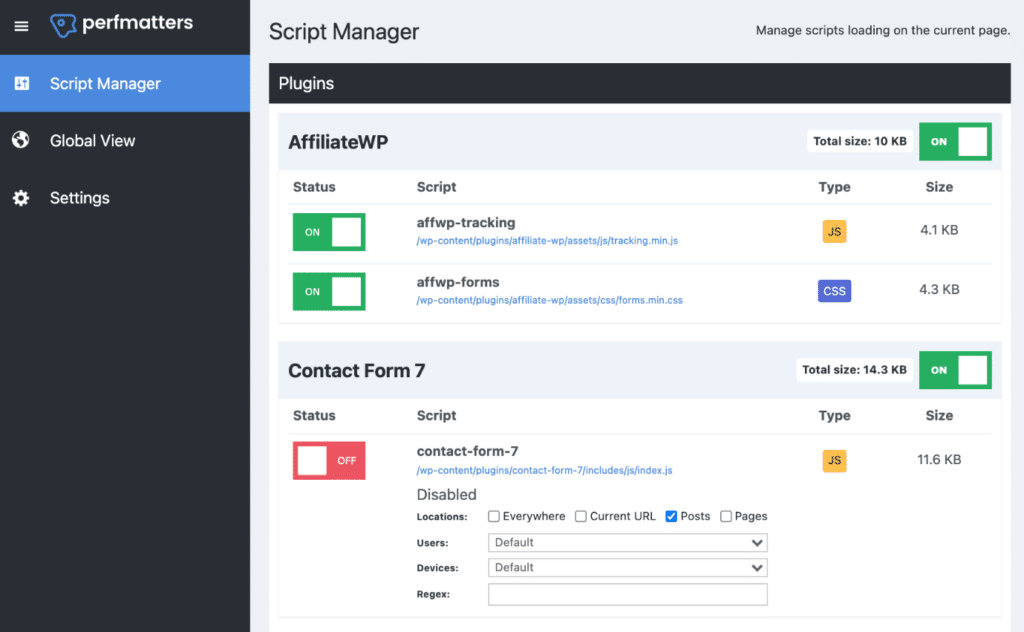
Stripe, PayPal, Square, and other payment gateways load JavaScript on every page of your site by default — not just at checkout. This JavaScript is large, loads from external servers, and must execute before your page becomes interactive. It increases INP scores and checkout page weight significantly.
Fix: Use Perfmatters or Asset CleanUp Pro to restrict payment gateway scripts to the checkout page only. This is the single most impactful WooCommerce checkout optimisation available without changing infrastructure.
Complex shipping rate calculations
WooCommerce calculates shipping rates on every page load during checkout, and every change to the destination address triggers a new AJAX calculation. The more shipping zones, rates, and condition rules you have configured, the slower these calculations become. Complex shipping configurations (e.g. destination-based rules with 50+ zones, weight table rates, conditional free shipping) can add 200–500ms to checkout response times.
Coupon validation queries
When a coupon code is applied, WooCommerce runs multiple database queries to validate it: checking expiry, usage limits, minimum order values, excluded categories, and more. On stores with many historical coupon codes or complex usage rules, these queries can be slow.
Plugin conflicts and hook overhead
Every WooCommerce plugin can add PHP hooks that run on the checkout page. Loyalty plugins, review request plugins, subscription management, product bundles, advanced product options — all of these may add processing time to checkout, even if they don't visually appear there.
“Disabling cart fragments and restricting payment scripts to checkout halved our load time.”
Quick fixes to improve WooCommerce checkout speed
- Restrict payment gateway scripts to checkout page only (Perfmatters or Asset CleanUp)
- Enable Redis or Memcached object caching to reduce DB query time
- Simplify shipping zones — consolidate rules and remove unused zones
- Deactivate unused payment gateways (even inactive gateways can add PHP overhead)
- Enable Google Address Autocomplete to reduce address entry friction
- Use a performance-focused checkout plugin (e.g. WooCommerce Blocks checkout)
- Test checkout on mobile — most issues are worse on mobile connections
- Remove plugins that load JavaScript on checkout unnecessarily
What server-side optimisation can and cannot fix
Pros
- Object caching reduces DB query time for shipping and tax calculations
- Restricting gateway scripts to checkout-only meaningfully improves INP
- Removing unused plugins reduces PHP bootstrap time on checkout
- A faster hosting environment (LiteSpeed, NVMe SSD, PHP 8.2+) reduces raw processing time
Cons
- Checkout TTFB will always be limited by PHP processing — no caching is possible
- Every plugin that runs hooks on checkout adds unavoidable overhead
- Complex shipping and tax logic cannot be simplified without changing business rules
- External payment gateway scripts are outside your control — they load from Stripe/PayPal servers
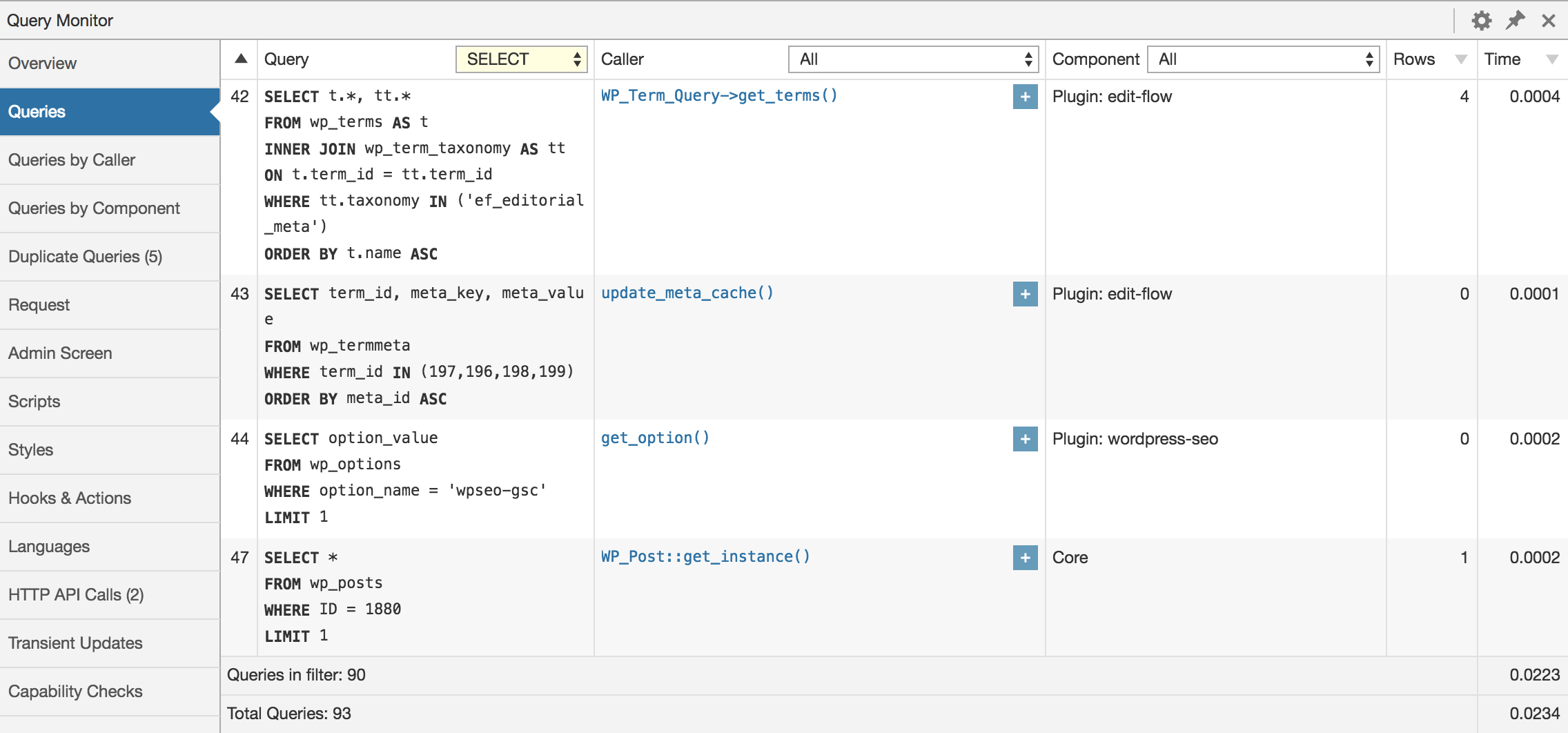
“Added object caching with Redis. Checkout went from 2.1s to 0.9s TTFB.”
The architectural solution: headless checkout
Every fix in the previous section improves WooCommerce checkout speed at the margins. The fundamental problem — that PHP must process every checkout request synchronously without caching — is not something configuration can solve.
A headless WooCommerce architecture changes this by separating the storefront from the checkout logic entirely. The browsing experience (product pages, category pages, search) is statically generated and served from edge CDN — instantaneous for every visitor. The checkout is a clean React component that communicates with WooCommerce's REST API directly.
In this model, checkout performance is still dependent on the WooCommerce REST API response time. But the difference is significant:
- No WordPress PHP bootstrap on checkout — the React app handles the UI
- No theme, page builder, or plugin scripts loaded on checkout
- The cart is managed in React state — no AJAX cart fragment requests
- WooCommerce processes just the order creation, shipping, and payment logic — not the rendering
- Payment scripts can be loaded lazily only when the checkout form is displayed
The checkout experience matters more than the score
For the full picture on the architectural case, read our guide to WooCommerce speed optimisation and what headless WooCommerce means in practice.
Keep reading
Related guides you might find useful
How to Speed Up WooCommerce: The Complete 10-Step Guide
A practical 10-step guide to WooCommerce speed optimisation — measure first, then caching, images, plugin cleanup, database tuning, CDN, object caching, and hosting, in the right order.
Read guidePerformanceWhy Is WooCommerce So Slow? The Architecture Problem (and the Fix)
Caching and hosting only go so far. Here's why WooCommerce is inherently slow, what the usual fixes miss, and how a headless frontend solves the root cause.
Read guidePerformanceHow to Audit Your WooCommerce Store Speed (Free Tool + Plugin)
Step-by-step guide to auditing your WooCommerce store speed — understand your PageSpeed score, Core Web Vitals, and what to fix. Free online tool and WordPress plugin included.
Read guideYour plugins are the bottleneck.
WPBundle replaces 13 WooCommerce plugins with one optimized suite. Faster load times, fewer conflicts, $149 once.
Join the Waitlist