Best WooCommerce Caching Plugins 2026 — Ranked & Tested
WooCommerce caching is harder than regular WordPress caching. Cart pages, checkout, and My Account are dynamic by nature and must never be cached — but your product and category pages absolutely should be. Most caching plugins handle this badly by default, leading to either a fast but broken store, or a safe but slow one. This guide covers the plugins that get WooCommerce caching right.
TL;DR
What makes WooCommerce caching different
Standard page caching serves a pre-built HTML file to every visitor. That works fine for a blog. For WooCommerce, it breaks things fast: cached cart quantities, stale stock counts, wrong prices after a sale, and — worst of all — other customers' checkout data served to the wrong session.
A good WooCommerce caching plugin must automatically exclude cart, checkout, and My Account pages, handle AJAX cart fragments without triggering uncached responses for the whole page, and invalidate product page cache correctly when stock levels change.
8
Plugins tested in this comparison
400–800ms
Typical WooCommerce TTFB without caching
<100ms
TTFB achievable with server-level caching
WP Rocket — Best overall for WooCommerce
WP Rocket is the most widely recommended caching plugin for WooCommerce, and for good reason: it works reliably out of the box without requiring you to understand every setting. On activation it automatically excludes WooCommerce's cart, checkout, and My Account pages and configures sensible defaults for the rest.
WP Rocket
The most popular premium WordPress caching plugin, optimised for WooCommerce out of the box.
WooCommerce features
- Auto-excludes cart, checkout, and My Account from caching
- Optimises WooCommerce cart fragment AJAX requests
- Caches empty-cart fragments to reduce server load
- Auto-purges product page cache when stock changes
- Dedicated WooCommerce settings tab in the dashboard
- Compatible with major WooCommerce payment gateways
Pros
- Works correctly with WooCommerce on first activation
- Clear, well-organised settings — no overwhelm
- Regular updates and active development
- 14-day money-back guarantee
Cons
- Premium only — no free tier to test before buying
- Support is ticket-based only (no live chat)
- Renewal price is 30% off, not 30% off forever
“Our WooCommerce store loaded noticeably faster within hours of installing.”
“Simple to configure, plays well with WooCommerce — checkout never breaks.”
LiteSpeed Cache — Best free option (on LiteSpeed hosting)
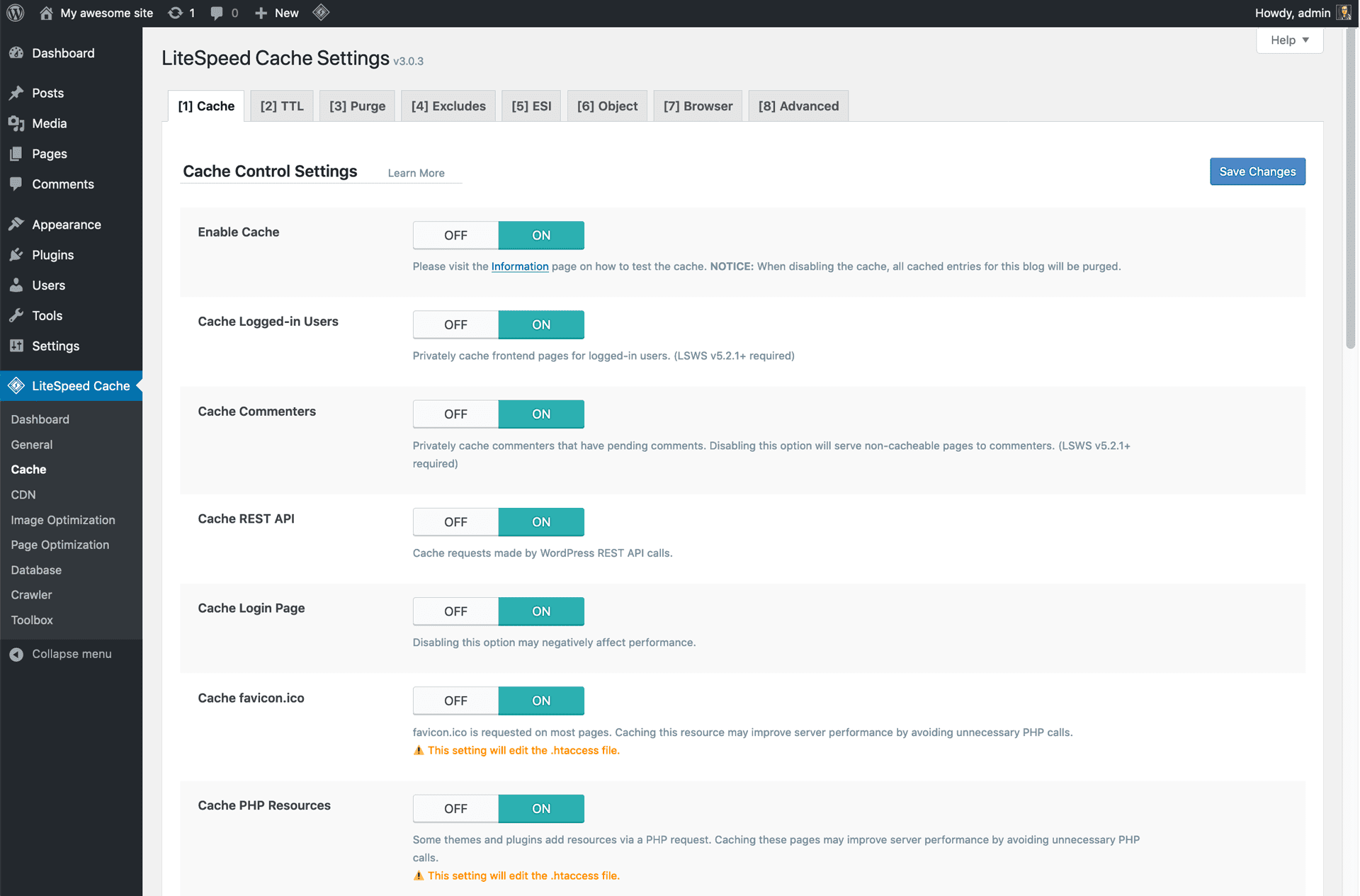
LiteSpeed Cache is arguably the most powerful free caching solution for WordPress and WooCommerce — but there is a significant catch. To use its server-level caching (the feature that makes it genuinely fast), you need to be running on a LiteSpeed or OpenLiteSpeed web server. On Nginx or Apache, it falls back to a standard PHP-based caching approach.
If you're on LiteSpeed-based hosting (A2 Hosting, Hostinger, Namecheap, Cloudways with OpenLiteSpeed, or a dedicated LiteSpeed server), this plugin is exceptional. Server-level caching bypasses PHP entirely for cached pages — not even WordPress loads — which is the fastest possible delivery method.
LiteSpeed Cache
Server-level caching for WordPress and WooCommerce on LiteSpeed and OpenLiteSpeed servers.
WooCommerce features
- Auto-detects WooCommerce — excludes cart/checkout/My Account by default
- ESI (Edge Side Includes) — cache pages with dynamic cart widget separately
- Object caching via Redis/Memcached — dramatically reduces DB query load
- Built-in image optimisation: WebP, AVIF, LQIP lazy loading
- Configurable do-not-cache cookie rules for WooCommerce sessions
- Server-level caching bypasses PHP entirely for cached pages
Pros
- Completely free — no paid tier or upsells
- Server-level caching is the fastest available approach
- Built-in image optimisation, CDN, and database tools
- Active development and large community
Cons
- Server-level caching requires LiteSpeed or OpenLiteSpeed hosting
- Misconfiguration can cause WooCommerce cart and session issues
- Settings are complex for newcomers
“Absolutely transformed our site speed. Server-level caching is in a different league.”
Watch out for cart and session issues
NitroPack — Best all-in-one optimisation
NitroPack takes a different approach to every other plugin here: it manages everything on its own servers rather than on yours. Your HTML is sent to NitroPack's cloud infrastructure, optimised, and then served back through their global CDN. You get page caching, image optimisation, CSS/JS minification, and CDN delivery in a single subscription.
The results are often dramatic. NitroPack reports a 52% Core Web Vitals pass rate across its platform — significantly above the web average. The trade-off is cost and control: pricing is based on monthly pageviews, which can make it expensive for high-traffic WooCommerce stores.
NitroPack
Cloud-based all-in-one performance optimisation with managed CDN and smart cache invalidation.
WooCommerce features
- Cart Cache: serves optimised pages even after items are added to cart
- Smart cache invalidation — only refreshes pages affected by catalogue changes
- Auto-excludes cart, checkout, and My Account from optimisations
- Global CDN (100+ countries, Cloudflare-powered) included
- Replaces caching plugin, image optimiser, and CDN in one subscription
Pros
- All-in-one solution — replaces multiple plugins
- Managed CDN included in every plan
- Smart cache invalidation reduces unnecessary rebuilds
- 4.9 stars on Trustpilot from 1,100+ reviews
Cons
- Pricing scales with pageviews — can get expensive at scale
- Aggressive JS optimisation can break WooCommerce dynamic features
- Less control than a self-hosted caching plugin
- Cloud processing means your content leaves your server
“Went from 40 to 95 on PageSpeed Insights. WooCommerce cart still works perfectly.”
“Broke my add-to-cart button. Support fixed it but took two days.”
FlyingPress — Best value premium plugin
FlyingPress is less well-known than WP Rocket, but it's worth serious consideration for WooCommerce stores. It combines page caching, CSS/JS optimisation, image optimisation, and a built-in Core Web Vitals monitor in one relatively affordable package. Its WooCommerce handling is solid, with sensible defaults for cart and checkout exclusions.
FlyingPress
An all-in-one caching and optimisation plugin with built-in Core Web Vitals monitoring.
WooCommerce features
- Auto-excludes /cart/, /checkout/, and /my-account/ by default
- Serves cached pages for browsing; cache bypassed at cart interaction
- Smart cache invalidation on stock and product updates
- CSS/JS optimisation with per-page exclusion rules
- Built-in WebP/AVIF generation and lazy loading
- Real-time Core Web Vitals dashboard
Pros
- Competitive pricing vs WP Rocket for more features
- Built-in CWV monitoring — no third-party tool needed
- Active development and responsive support
- 14-day free trial available
Cons
- Not compatible with Elementor in some configurations
- Cannot run alongside WP Rocket, W3 Total Cache, or WP-Optimize
- Smaller community than WP Rocket — fewer third-party guides
W3 Total Cache — Most powerful (free tier available)
W3 Total Cache is the most feature-complete caching plugin available, with a free tier that covers page caching, object caching, database caching, browser caching, and CDN integration. The problem is complexity: 16 settings tabs, dozens of options per tab, and zero hand-holding. For developers who know what they're doing, it's excellent. For everyone else, it's the plugin most likely to break a WooCommerce store.
W3 Total Cache
The most feature-complete WordPress caching plugin — powerful but complex to configure.
WooCommerce features
- Page, object, database, and browser caching in free tier
- Pro: fragment caching for dynamic cart/checkout content
- CDN integration for static WooCommerce assets
- Object caching via Redis/Memcached
- Reported 41% reduction in server CPU on WooCommerce stores
Pros
- Extremely powerful — more options than any other plugin
- Free tier covers most common optimisations
- Object caching support reduces WooCommerce DB query load
- Large community and extensive documentation
Cons
- 16 settings tabs — overwhelming for non-developers
- Minify feature regularly breaks WooCommerce themes and builders
- Misconfiguration is common and can be hard to debug
“Powerful but the settings are intimidating. Broke my site on first try.”
WP Super Cache — Best for simple sites
WP Super Cache is made by Automattic (the company behind WordPress and WooCommerce), which means it has native WooCommerce compatibility baked in. It's straightforward, reliable, and free. What it lacks is everything beyond basic page caching: no image optimisation, no CSS/JS minification, no CDN. If you need a dead-simple caching layer and plan to pair it with Autoptimize for code optimisation, it's a solid choice.
WP Super Cache
Simple, reliable page caching by Automattic — WooCommerce-compatible by design.
WooCommerce features
- WooCommerce signals the plugin to auto-skip cart/checkout/My Account
- Three caching modes: Simple, WP-Cache, and Expert (mod_rewrite)
- Garbage collection removes stale cached files automatically
- CDN support for static assets
Pros
- Made by Automattic — WooCommerce compatibility is a first-class concern
- Completely free, no upsells
- Simple setup — minimal configuration required
- Expert mode (mod_rewrite) is very fast for static pages
Cons
- No image optimisation, CSS/JS minification, or lazy loading
- Needs companion plugins (Autoptimize, Imagify) for a complete solution
- Object caching not included
Autoptimize — Best for code optimisation
Autoptimize is not a caching plugin — it's a code optimiser. It aggregates, minifies, and defers CSS and JavaScript to speed up page rendering without touching page caching. Pair it with WP Super Cache or LiteSpeed Cache for a complete solution.
The critical WooCommerce caveat: JavaScript aggregation frequently breaks WooCommerce's variable product selectors, AJAX add-to-cart, and dynamic pricing. If you enable JS optimisation, you will likely need to create exclusion rules for WooCommerce's scripts. The plugin makes this manageable, but it requires testing.
Autoptimize
CSS/JS/HTML optimiser — pairs with a caching plugin for a complete solution.
WooCommerce features
- Built-in WooCommerce exclusion toggle for JS/CSS optimisation
- Async JS loading reduces render-blocking on category/product pages
- Inline critical CSS improves above-the-fold rendering
- Google Fonts optimisation reduces third-party latency
Pros
- Free and well-maintained
- WooCommerce exclusion toggle is a thoughtful addition
- Pairs well with WP Super Cache or LiteSpeed Cache
- 4.7 stars on WP.org with 1,400+ reviews
Cons
- Not a caching plugin — page caching must come from elsewhere
- JS aggregation commonly breaks WooCommerce variable products and AJAX features
- Exclusion rules require manual testing per theme and plugin combination
Perfmatters — Best script manager for WooCommerce
Perfmatters is also not a caching plugin — it's a script manager and performance utility. Its headline feature for WooCommerce is disabling the WooCommerce cart fragments AJAX request (wc-ajax=get_refreshed_fragments) when the cart is empty. This single change can meaningfully reduce server load and TTFB on WooCommerce stores where most visitors have empty carts.
Perfmatters
Script manager and performance utility — disables unnecessary WooCommerce scripts per page.
WooCommerce features
- Disable cart fragment AJAX when cart is empty — reduces TTFB meaningfully
- Disable unused WooCommerce scripts/styles globally with auto-exclusions on store pages
- Script Manager: disable any plugin JS/CSS on a per-page basis
- Delay JS until user interaction — configurable per-script
- Built-in lazy loading with first-image skip
Pros
- Affordable — cheapest premium plugin here
- Cart fragment disable is an immediate TTFB win for many stores
- Script Manager is unmatched for per-page JS control
- 30-day money-back guarantee
Cons
- No page caching — must pair with a caching plugin
- Script Manager can silently break WooCommerce if used carelessly
- Not on WP.org — fewer independent reviews available
Which plugin is right for your WooCommerce store?
Here's a quick decision framework based on your situation:
Recommended combinations by scenario
- Non-technical store owner, wants simplicity: WP Rocket (everything in one, sensible defaults)
- Budget-conscious, on LiteSpeed hosting: LiteSpeed Cache + Autoptimize (free, powerful)
- Budget-conscious, on Nginx/Apache: WP Super Cache + Autoptimize (free, reliable)
- Want the best possible scores, happy to pay: NitroPack or FlyingPress
- Developer who wants full control: W3 Total Cache + Perfmatters
- Already have a caching plugin, want more control: Add Perfmatters for script management
Why caching only goes so far
Every plugin in this guide improves WooCommerce performance meaningfully. But they all share the same fundamental constraint: WooCommerce's cart, checkout, and any personalised pages cannot be cached. These are exactly the pages your conversion rate depends on.
The architectural reason is covered in detail in our WooCommerce speed optimisation guide. The short version: PHP renders these pages synchronously on every request, and no caching plugin can change that. A headless WooCommerce frontend sidesteps this entirely by rebuilding the storefront in React — delivering the speed of static pages for browsing, with a clean API-driven checkout that's isolated from the PHP overhead.
If you've applied caching and still aren't happy with the results, headless is the next step. Read our guide to what headless WooCommerce is to understand whether it's the right move for your store.
Keep reading
Related guides you might find useful
Why Is WooCommerce So Slow? The Architecture Problem (and the Fix)
Caching and hosting only go so far. Here's why WooCommerce is inherently slow, what the usual fixes miss, and how a headless frontend solves the root cause.
Read guidePerformanceHow to Audit Your WooCommerce Store Speed (Free Tool + Plugin)
Step-by-step guide to auditing your WooCommerce store speed — understand your PageSpeed score, Core Web Vitals, and what to fix. Free online tool and WordPress plugin included.
Read guidePerformanceWooCommerce Speed Test Plugin: Audit Your Store from WordPress Admin
How to install and use the free WooCommerce Speed Audit plugin — one-click PageSpeed audits for your Shop, Cart, and Checkout pages plus headless compatibility scanning.
Read guideYour plugins are the bottleneck.
WPBundle replaces 13 WooCommerce plugins with one optimized suite. Faster load times, fewer conflicts, $149 once.
Join the Waitlist